CPOS Web Printing
Print receipts and open the cash drawer from a web app on a CPOS device. CPOS Helper
behaves as an Epson TM receipt printer at http://127.0.0.1:9100.
Overview
Write your app against Epson's ePOS-Print XML specification, exactly as you would for a real Epson printer. This guide does not repeat that specification. It covers how to connect, and the places where the Helper deliberately differs from an Epson printer.
Every job goes through one print queue. The physical printer (built-in head, USB, Bluetooth or network) and the drawer mode are configured in the CPOS Helper app, so your app does not need to know which one it is talking to.
ePOS-Print XML is the supported route for web apps. A raw ESC/POS route exists for apps that already build ESC/POS themselves.
Requirements
-
CPOS Helper 2.5.16 or later. Ask the shop to update an older Helper before going live. After installing an update, open the CPOS Helper app once so the print service starts.
-
The web app runs on the CPOS device itself. The Helper listens on
127.0.0.1only. A PC or tablet elsewhere in the shop cannot reach it through the device's LAN address. -
Call
http://127.0.0.1:9100, neverhttps://. There is no certificate for127.0.0.1. Anhttps://page may still call it: browsers exempt loopback from mixed-content blocking. -
Allow local access when Chrome asks. The first time an https site calls the Helper, Chrome asks whether the site may access apps and services on this device. Choose Allow; Chrome remembers it for that site. If it was blocked, re-enable it in the site settings (the icon left of the address bar).
-
Send plain HTTP POSTs, not the ePOS SDK.
ePOSDevice.connect()from Epson's ePOS SDK for JavaScript talks WebSocket on ports 8008/8043, which the Helper does not serve. -
A supported CPOS model. The print service only runs on supported CPOS models. On any other device port 9100 does not answer.
CORS needs nothing from you: the Helper answers the OPTIONS preflight and
echoes your Origin.
Quick start
Check the printer
GET /status is a CPOS addition, not part of ePOS-Print. See
the fields.
Send a receipt
POST an ePOS-Print document with fetch(). A receipt can be sent as text or as one
image you draw yourself.
Small requests that print fast and sharp. Use it unless you need something only an image can do. The sample is a full cafe receipt: a large heading, small and reversed text, Thai item names with prices aligned right, notes, rules, a CODE128 barcode, a QR code, the cut and the drawer.
Pad columns the way a Thai-mode printer counts them: a mark above or below a Thai letter
shares that letter's column, which is what columns() in the sample does. The Helper
draws Thai in the same grid, so the prices line up. <layout> centres a 58 mm
receipt on 80 mm paper, so pick 58 mm below to try one on an 80 mm printer.
Whitespace inside <text> is printed, so do not indent the XML there. Use
for a new line. Text attributes stay in effect until a later
<text> changes them, which is why the sample switches each one back off.
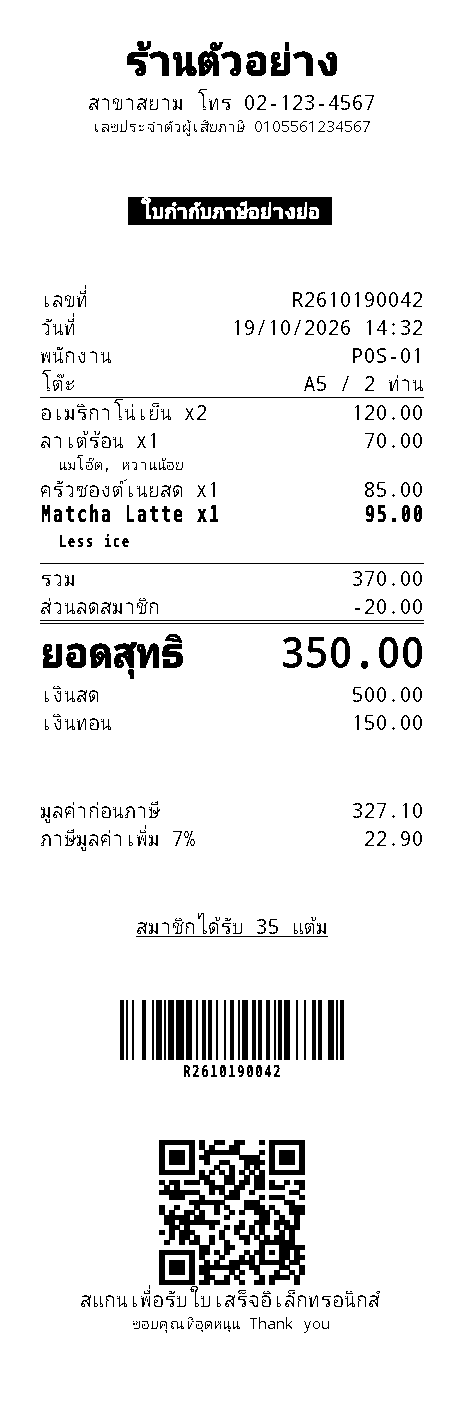
The expected print is rendered from the Helper's own output. English text uses the printer's font, so its shape varies by printer.
Draw the receipt on a <canvas> and send it as one <image>.
The paper shows exactly what you drew: any font and size, a logo, a layout the character grid
cannot express. The request is far larger than text and prints slower.
Draw at the paper's width in dots so the Helper never has to scale or crop the image; a 58 mm
image on 80 mm paper is centred by align="center". Each pixel becomes one bit, most
significant bit leftmost, set for black. Other elements still work between images, like the
barcode and QR code here, which the printer draws itself.
This is also the way to print in your own font. Load it before drawing with
document.fonts.load(), once per weight: a canvas does not wait for a web font and
silently falls back to a system one. At 203 dpi a stroke thinner than about 2 dots breaks up, so
keep text at 20 px or larger and avoid light weights.
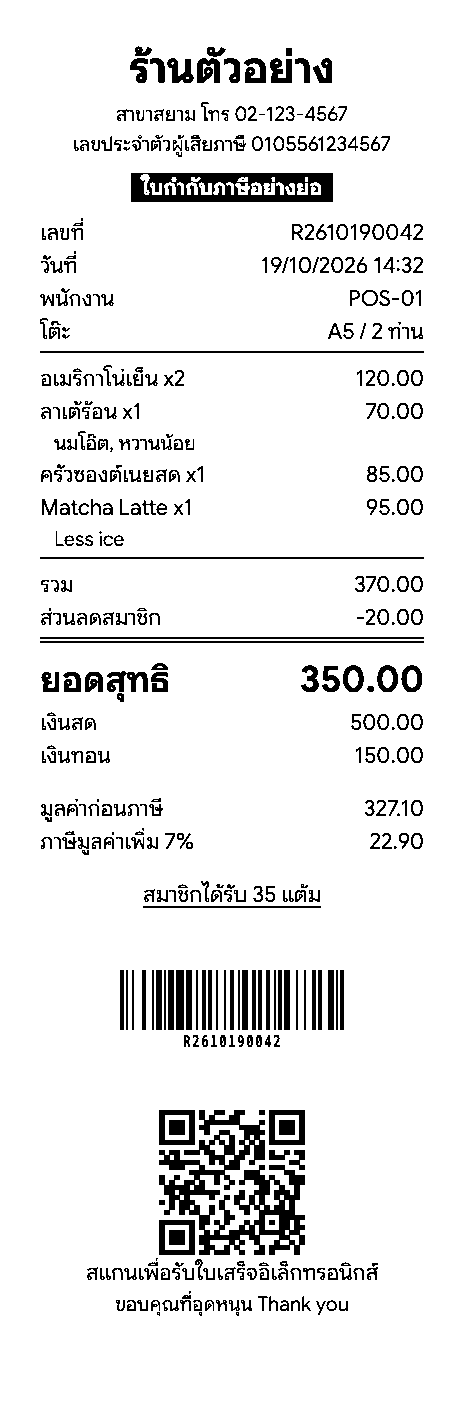
The expected print is rendered from the Helper's own output. Run shows the image this device draws.
The reply has the same shape as a real Epson printer's:
<response xmlns="http://www.epson-pos.com/schemas/2011/03/epos-print"
          success="true" code="" status="6" battery="0"/>
Read the reply
success="true" means queued, not printedstatus for the printer's
health.if (!queued) showError("Rejected: " + reply);
else if (status & 0x00000001) showWarning("Printer is not responding");
else if (status & 0x00080000) showWarning("Out of paper");
else if (status & 0x00000020) showWarning("Printer cover is open");All bits are listed under Status bits.
Differences from an Epson printer
These change how you write your app:
success="true"means the job is queued. See Read the reply.- Printer faults are reported in
statusonly.codeis set only when the request itself is rejected, for exampleSchemaErrorfor malformed XML. - Non-ASCII text is printed as an image. ASCII lines use the printer's font. A line containing any other character (Thai included) is drawn by the Helper and sent as an image, with the same style attributes. Thai therefore works on every printer. The image keeps the printer's character grid, as a Thai-mode printer does, so columns padded with spaces line up on Thai lines too.
<cut type="reserve">cuts immediately with a feed, likefeed. Generic printers lack the reserve function.
All other differences
| Topic | Epson printer | CPOS Helper |
|---|---|---|
<layout> |
Label and black mark settings | No printer command. Its width (0.1 mm units: 720 for 80 mm paper, 480 for 58 mm)
sets the frame the Helper lays the document out in. Without it, the printer aligns against the
paper it has. |
| Not supported | - | <vline-begin>/<vline-end>, and MaxiCode, Aztec and 2D GS1
DataBar in <symbol>. They are skipped and the rest of the receipt still
prints. |
<sound> |
Named buzzer patterns | A plain beep (BEL), repeated. |
| Cuts on the M1/M10 built-in head | As requested | That head cuts wherever the paper stands, so the Helper always feeds it to the cutter first,
no_feed included. Other printers get exactly the cut you asked for. |
<page> on the built-in head |
Page mode | Printed in standard mode instead. |
devid, timeout |
Select the device and the job timeout | Accepted and ignored. Any POST path other than /raw is treated as ePOS. |
battery |
Battery level on mobile printers | Always 0. |
| Request size | Printer dependent | Up to 12 MB. Larger requests get HTTP 413. |
Reference
GET /status
{"service":"cpos-helper","port":9100,"running":true,"output":"usb","printer":"USB:1155-30016",
 "drawerMode":"both","printableDots":576,"queuedJobs":0,"connected":true,
"health":"Ready","status":4}| Field | Meaning |
|---|---|
running | The print service is up. |
connected | The Helper can reach the physical printer. |
health | Readable state, such as Ready, Paper out,
Cover open. |
printableDots | Printable width the Helper assumes when a document does not state one (384 = 58 mm, 576 = 80 mm). |
queuedJobs | Jobs waiting in the queue. |
status | The ASB word, see Status bits. |
Opening http://127.0.0.1:9100/ in a browser on the device shows the same information as a
page.
Status bits
status is the Epson ASB word. These are the bits the Helper sets:
| Bit | Meaning |
|---|---|
0x00000001 | No response: the printer is not answering, or the Helper has no reading yet. Ignore the other bits. |
0x00000002 | The job was accepted (print replies only). |
0x00000004 | Drawer kick connector. Always set when the printer answers; carries no information. |
0x00000008 | Offline. Set together with cover open, paper end or an error. |
0x00000020 | Cover open. |
0x00002000 | Unrecoverable error. |
0x00020000 | Paper near end. |
0x00080000 | Paper end. |
A healthy printer gives 6 in a print reply and 4 from GET /status.
The Helper does not report the cutter error bit.
Raw ESC/POS
POST /raw takes an ESC/POS byte stream. Use it only if your app already produces ESC/POS;
otherwise use ePOS-Print. The bytes reach the printer unchanged, with two exceptions: the drawer kick
(ESC p) follows the drawer mode set in the Helper, and status queries (DLE EOT,
GS r) are answered by the Helper.
- End each receipt with
GS V 66 0(orGS V 65 0for a full cut). The printer then feeds to its own cutter.GS V 0/GS V 1cut wherever the paper stands, so the last lines of the receipt stay above the cutter unless you have fed far enough yourself, and that distance differs between printers. - Send Thai and other non-ASCII text as an image (
GS v 0), for example drawn on a<canvas>. Printers have no Thai code page you can rely on. If you do not want to do this, use ePOS-Print. - Encode a string body. If your app builds the receipt as a string, send it with
?encoding=base64or?encoding=hexandContent-Type: text/plain. A string body is UTF-8 encoded by the browser and bytes above0x7Fwould be corrupted.
fetch(PRINTER_URL + "/raw?encoding=base64", { method: "POST", headers: { "Content-Type": "text/plain" }, body: btoa(binaryString) });
fetch(PRINTER_URL + "/raw?encoding=hex",    { method: "POST", headers: { "Content-Type": "text/plain" }, body: "1b40 48 49 0a 1d564200" });
The reply is JSON with the same status word. success: true again means
queued.
Troubleshooting
fetch fails with TypeError: Failed to fetch and no detail
- Cause
- The Helper is not running, the URL is
https://, the page is open on another machine, or the site was blocked from accessing apps and services on this device. - Fix
- The browser console shows which check blocked it. Go through the Requirements.
success="true" but nothing prints
- Cause
- The job is waiting in the queue for the printer.
- Fix
- Read
statusin the reply andqueuedJobsinGET /status, then clear the fault the printer reports.
- Fix
- ePOS: use
<cut type="feed"/>and CPOS Helper 2.5.16 or later. Raw: end withGS V 66 0.
- Cause
- Printers have no Thai code page you can rely on.
- Fix
- Send it as an image, or use ePOS-Print.
- Fix
- Check the drawer mode in the CPOS Helper app (
both,usbortelpo).
References
- Epson ePOS-Print XML reference, for example the
<cut>element. The parts about configuring an Epson printer (network settings,devid, ePOS-Device, WebSocket) do not apply to the Helper. - Epson ESC/POS Command Reference, for the raw route.